Wednesday, September 12

Guild Wars 2 Animation Techniques

The game I decided to play (and have been a lot lately) is Guild Wars 2.  It is a new MMO which was released on August 28th, just a few weeks ago.  

Being an MMO with a very diverse world, there are many different player and npc character models running about.  I complement ArenaNet on a job well done with all the character animations in the game.  From the very beginning, I noticed how smooth my character transitioned from idle, to walking, to a running animation.  There was no jumpy movements; just a seamless flow of movement which looks very natural.


Pictured above is my Sylvari Ranger.  In the picture you can also see the vividness of the world I am exploring.  The grass and trees blow in the wind, creatures mill about, and npc's interact with each other.  Great care was put into each animation to make sure it is smooth and organic.

In the screenshot you can also note the various particle effects going on around my player.  There is sparkly dust and fireflies in the air, and a water portal in the distance to the left.  All these particle systems are dynamic and have their own properties.  Each adds atmosphere to the game world and helps bring it alive. 

A majority of the characters in GW2 are bipedal, and as such ArenaNet put a lot of working into making convincing movement and animations.  There is no feet-skating present so your character very rarely clips through objects or the environment.  The following screenshot is very good example of these systems at work.


Due to the huge variety in poses a character in GW2 can do, I believe all these animations are done using a skeletal system.  Each races /dance emote makes the character perform a very complicated dance with a large number of different poses.  These animations are on their own though, meaning they cannot be blended to or from a running animation.


One of the first things I noticed about my character when I started playing was how their clothing moved as they did.  In the video above if you watch carefully you can observe the bottom of the tunic moving with the character.  All the cloth and hair animation is done real-time using a physics engine.  It moves and sways with the wind and with the movement of your character.

As a ranger, my character uses a shortbow and longbow as their primary weapons.  Early on I noticed that every shot I took was affected by gravity.  The arrows would arc towards targets which were further away.  This effect has a major impact on game play, as it can be a true tactical advantage to having the high ground.  When trying to shoot an enemy up on a keep wall, often the arrow will not reach its target because of the arc path it flies on.  Conversely, on top of a wall, it is easy to shoot at enemies down below, and from a fairly long range.


Its a little difficult to tell from the video, but each arrow fired is affected by gravity on its way to the target.  It is a subtle yet important detail that is often missed in these types of games.  ArenaNet really focused on making Guild Wars 2 both look good and play good, and this all comes about from consistent and effective animation techniques.  If you go look at WoW for example, you'll notice a large difference in the fluidity of the character animations.

Guild Wars 2 has been proclaimed as a 'beautiful looking game' and players definitely notice the high quality of the many different animations present in the game.


Monday, March 26

A Little Texturing Tutorial

Well its been a few weeks but I can proudly say I've gotten a whole bunch of shaders done lately.  With that said, I'm much more confident texturing with shaders now, so I'm going to give a simple tutorial on how to slap on some textures for your models.

Lets start with the basics, you're going to need a variable to hold the texture itself. (Make sure the texture is in your project file!)  Preferably this variable should be off in your global header somewhere to keep your main from getting cluttered.

static GLuint textureName;

This variable holds the information for whichever texture you choose.  Loading the texture is just as simple.  **Make sure you have all your DevIL libs included, and initialized**  DevIL pretty much takes care of this step for you with:

textureName = ilutGLLoadImage("nameOfTextureFile.extension");

You can throw this function in main or maybe somewhere in your code where it can be dynamically changed on the fly.  Its up to you, but for this tutorial the texture is loaded in main as that is all which is necessary.

Next you'll want to make sure all your CG stuff is initialized properly.  I'll assume you know the basics of setting up a context/program/profile etc so I'll just show you how to get the parameter.  Note that it can be a vertex or fragment parameter, it doesn't make a big difference for a simple program like this.

cgVertexParam_textureMap = cgGetNamedParameter(vertexProgram, "textureMap");

Now that you have the texture initialized, your shader will need to know where to get the texture coordinates.  These come from the actual drawing of your shape/obj.  Somewhere in your code you must have 

glTexCoord2f(0.0,0.0);

for each texture coordinate your shape/obj has.  This is crucial because your shader program will use these valuables when it has the correct semantic.

There's one more important thing to add in your main code, but I'm going to jump ahead to the shader itself for now.  In the vertex or fragment shader, you will need a variable called 

float2 texCoord : TEXCOORD0

This variable is varying, so it will automatically take in the values you specified with glTexCoord2f().

If you put this variable in your vertex shader, you should just pass it along to the fragment shader by specifying an out variable like so

out float2 oTexCoord : TEXCOORD0

Now in your fragment shader, you will need both the texCoord variable and a new one to specify the textureMap which the shader will use.  Remember that textureMap parameter we set?  Now it finally gets to be part of the action.   The variable goes as such:

uniform sampler2D textureMap : TEXUNIT0

The uniform states it is a constant variable set by the program, the sampler2D is what grabs the actual texture, and TEXUNIT0 tell the shader which texture is going to be applied.

Lets go back to the program itself for a moment, and set the texture that will be applied in the shader.  This code should be in the display function after you bind your programs and enable the shader profiles.

glActiveTextureARB(GL_TEXTURE0_ARB);
glBindTexture(GL_TEXTURE_2D,textureMap);


These two lines of code tell the shader which texture is being used, and then binds it to the textureMap variable.  Note the TEXTURE0 will match up with TEXUNIT0 in your fragment shader.  **I do not think glEnable(TEXTURE_2D) is necessary because the shader itself handles all the texturing instead of OpenGL**


Now back to the fragment shader to put it all together.  As long as there is some form of lighting in your program (ambient is fine) then the following code should make your shape/obj nice and pretty:


float3 mappedObj = tex2D(textureMap, texCoord);


This applies the texture you loaded and matches it up with the texture coordinates you have specified.  Now you can multiply this with your ambient colour (make sure its white) and output your final colour.  Voila, you have a beautifully textured object; not that difficult eh?


**As a side note, if you want to blend multiple textures its as easy as setting more texture parameters, then lerping them in the fragment shader.**


:D

Sunday, March 25

Fun Fun for Everyone


This week I'm going to take a look at two very different games that I consider a lot of fun, and see if I can match them to some of the fun categories from the lecture.  I really liked the BrainHex model because of how it relates to the parts of the brain used for different feelings.  I will use that model and see how these games fit in.


The BrainHex model takes into account how different parts of the brain control different states of mind which video games can create in a player.  The seven states listed below are not mutually exclusive, as often a player can be of multiple types.  There are also several exceptions which take into account things a player really dislikes in a game.
A visual representation of the 7-pointed BrainHex model.
Before looking at the following games I decided to take the test myself, and see what I was rated as. (http://survey.ihobo.com/BrainHex/)  The results showed I am a Conquerer-Daredevil with a No Fear exception.  This means I enjoy struggling to defeat difficult foes and rushing around at high speed while being in control, and I dislike not being in control of the situation around me.


My scores were:
Conqueror: 19
Daredevil: 16
Achiever: 14
Mastermind: 8
Socialiser: 7
Seeker: 6
Survivor: -6

Now for the games; first up is Diablo 2.  This RPG features fast-paced dungeon crawling action, pitting your character up against the minions of hell.  You begin by choosing one of 5 unique classes and then progress through the game's five-act storyline.  

While the basic enemies in the game can be mowed down in waves, taking down a boss is extremely different.  They have up to 1000x more health than a regular enemy and some of them can kill you in 1-shot at higher difficulty levels.  Leading up to each boss is usually a multi-level dungeon which must be traversed.  It contains hordes of regular enemies which you must carve a swath through to reach the end boss.


In order to facilitate the defeat of these powerful demons, your character gains experience and levels up by defeating enemies.  This gives you stronger spells and abilities.  Combine that with the thousands of different items enemies can drop, and it becomes all about getting the best loot.  With the right equipment and spells, any previously impossible boss can be taken down with some effort.

The two core elements found in Diablo 2 match up with my main BrainHex types.  Conquerer is found in Diablo 2 with the arduous boss fights; I died many times to Duriel and Diablo in particular.  The feeling of fiero when finally defeating one of these challenging bosses is a thrill and really made the game fun for me.  It also encourages players to go back to previous bosses, enhancing its replay value for the fun-inducing boss fights.


Taking into account my Daredevil type, smashing through a dungeon at high speeds is quite the thrill in Diablo 2.  With the proper spells you can take out a dozen+ enemies at once and just keep on moving.  Blizzard designed the dungeons to have low-downtime to keep the epinephrine pumping and keep the player engrossed in the game world.  Its a lot of fun to go through dungeons at high speeds and obliterate everything in your path. 

In contrast, Super Smash Bros. Melee has a whole different set of game mechanics.  There is no levelling up, no stats, no equipment sets, no real bosses, and no largely different levels.  The game play is comprised of picking a character and using combinations of controls to perform various attacks.  Every character has unique attacks and properties (ie., agility and power) which affect how they are played.  A skilled player can use these properties to their advantage and defeat their enemies.


SSBM focuses on the multi-player aspect because at its core it is a fighting game.  When playing against my friends I noticed I enjoy the game most when I am fighting others that are also skilled and prove to be a challenge to defeat (this also ties to the flow theory!).  My Conquerer type comes out when I am fighting a skilled opponent, as I enjoy the level of difficulty and it feels great to defeat them when I am trying my hardest.  

You'll note I also had 7 points in the Socialiser type, showing that most people are a mix of 6 or 7 of all the personalities.  This is prominent in a multi-player situation where you are physically with all the other players.  Fighting against NPC's in Smash Bros is boring because they are both too easy, and not as interesting as fighting real people where social dynamics can come into play.

The fact that tournaments are still held for SSBM 11 years later shows that the developers really hit the mark for creating a fighting game which keeps players interested.  The video shown is in real time, and as you can see both players are moving with extreme speed and precise control.  The Daredevil personality in me really enjoys the fast paced nature of Melee and the role skill plays into being good at the it.  

Being able to concisely control your characters movements is absolutely crucial to winning in Melee, and that embodies the personality of a Daredevil.  To prove my point, just look at the differences between Melee and Brawl.  My friends and I have boycotted Brawl because its just too sluggish in comparison, and the matches seem much slower.  Even the gravity is reduced and overall its not nearly as fun.  Maybe I'm saying this from a more experienced perspective, but the below video is so much less interesting than the previous one.


To summarize, the BrainHex model is based on 7 different gamer (not necessarily) personalities which tie into various types of games.  Different genres of games can be fun for the same types of personalities despite much different game play mechanics.  My  type was Conquerer-Daredevil and the two games I presented prominently displayed these personalities.  Despite them totally different genres, they are both very fun to me because they suit me in a way that satisfies my psychological needs as a gamer.

Monday, March 12

Priorities

Dear Dr. Hogue:

It has come to my attention that I need to learn about prioritizing.  As fun as these blogs are, they have become a nuisance and are cutting into time I would rather be programming.  No offense as I don't mind blogging and personally I am a natural writer, but I really need to focus on getting the homework questions done.

With that said I have two different homework questions for you tomorrow.  Its been quite a while since I handed in the 'blue' shader but I've been valiantly struggling with the obj lerp and particle system shaders.  I slowly worked through all those awful errors (glMultiTexCoord and ESP stack pointer error argh) and got on a roll.  Again I hit a wall and struggled to figure out the final touches of the programs (I'm a slow/inefficient coder) but here we are.

I will still try to maintain my blog posts but at the moment not being able to write the final exam is obviously my biggest concern.  Lately I've been working on modelling/texturing for our game but I'm all shaders now.  Hopefully I'll have lots more to show you soon.  At this point I'm really not sure about my chances of getting 40exp, but I'm going to try my damn hardest until the very end.

I hope you can understand, 

-Taylor

Tuesday, March 6

Ray Tracing vs Radiosity

Over halfway into the semester we've starting touching on subjects that I can't really wrap my head around, so this week I did some extra research on ray tracing and radiosity, and I'm going to compare the two.  After I might look for some games with each style of lighting and see how they compare.

 http://www.ultrashock.com/forum/viewthread/54289/ 

This forum thread helped distinguish the differences between the two and summarize how each method works.

The main difference is that ray tracing is dependant on the camera position, while radiosity works fine with any arbitrary camera in the scene.  This means that any significant change in the camera's position will result in all the rays needing to be re-calculated again which is a relatively costly operation.  Ray tracing sends the rays out of the camera and they bounce around a certain number of times before they are gone.

Radiosity can be considered an extension of ray tracing, in that they can both be used to make a scene look very good.  It is calculated from the actual light sources, and the diffuse reflections of the light in the geometry of the scene.  Calculating radiosity is very processor intensive but can produce more realistic results, and can be pre-calculated if the scene's light sources do not move.


An additional advantage of radiosity is that it can simulate colour bleeding from one surface to another.  Since the calculations for radiosity only need to be done once, static scenes can take a lot less processing overall because you can freely move a camera around the scene after the calculations are performed.  To get the best result, a combination of both methods will work but the best, but be the most taxing to compute.


http://www.gametrailers.com/user-movie/raytracing-vs-radiosity-tech/182176


This video demonstrates the major differences the two methods can produce.

Monday, March 5

Examining Linearity

As with most weeks I like to brainstorm a topic in digital games and then delve into it, comparing its various aspects.  During this process I saw my Skyrim map poster hanging up to my left and it got me thinking about a topic I don't fully understand: the difference between linear and open-ended games.

The expansive province of Skyrim; fully explorable from top to bottom.
Well obviously I know the difference between them, but I'm trying to figure out the reasons that both of them are appealing to players despite being at opposite ends of the spectrum.  Furthermore I want to examine the MDA's behind these reasons to really get an idea of why these two different styles both captivate their audience.


Most RPG's and nearly all MMO's fall into the category of being open-ended games, featuring a large game world to explore.  Going to the core of the avocado, in an open game your character may navigate the world at your discretion and go where you want, went you want.  You can run, jump, swing your sword/use magic, harvest raw materials, and interact with the world's inhabitants.  This means that every action is your choice, from fighting a bear to climbing a mountain to simply wandering aimlessly.

If you can see it, you can go there.
These mechanics develop the major dynamics such as exploring the wonders of the world and fighting creatures along the way.  For example the player could run into a gigantic elite monster or find a creepy cave system to traverse.  In MMO's a bold player can travel to areas with higher level enemies to test his combat abilities, or group up to tackle even greater foes.  The idea is that each player may play at their own pace and with their own methods and preferences.
Ragnaros, a final boss in WoW.
The aesthetics that come out of it are visually stimulating game worlds with awe-inspiring locales and a strong feeling of being immersed within a living, fluctuating environment.  The player makes a journey out of the game instead of going on the game's journey.  Expansive worlds like this take a lot of detail and effort to create but done well they can give a player many hours of enjoyment.  Tons of unique quests, environments, enemies, and items can give these worlds a lot of depth and replay value.

Players enjoy this sense of freedom and exploration because we are naturally curious.  Secrets and unanswered questions push the player to continue searching and discovering new things.  Many of the choices in open games are big and lead down very different paths based on where the player chooses to go.  This can be said for choosing your character's class and skills as well, as there are usually many to pick from and will make a big impact on the player's experience in the game.

A few of the 15+ skills you can train in Skyrim.

For example in Skyrim there are various different questlines in different guilds, and the player is free to do them (or not) in any order they choose.  I personally know that lots of players like to experience all the other content before completing the main questline because it usually contains the most intense set pieces and makes for a good climax.

The true downside to a huge game world is that sometimes it feels like nothing is extra-special in it.  A lot of time is needed to create that much content, so the highlights are few and far between.  Comparing this to a game like Uncharted, and its on a whole different level.
Hellfire Peninsula is a big area...and it can get a little bland.

Linear games usually involve moving to the next area, shooting everything/navigating through the level, and repeat.  The mechanics are actually very similar to an open game in terms of player navigation and possible actions they can perform.  The difference comes from how the player is able to interact with their world, and the pacing of the action.


A linear game does not wait around for players to discover things or find secrets; there is almost always something going on.  The dynamics in a linear game are how players must fight against increased numbers of enemies in more enclosed environments, kind of like a funnel.  An analogy is being on a water-slide compared to a wave pool at an amusement park.  In both settings there is moving water (conflict), but it presented to you at a different pace and you may choose to leave the wave pool.


Because the player in a linear game cannot pick and choose what experiences they have in the game, they often contain more dynamic engagements and unique elements.  The Uncharted series is based off very intense 'set pieces' which are basically scripted events on a large scale.  Each set-piece will happen once throughout the game's story line and is a memorable experience for players.


This set piece piece occurs in a sinking cruise ship, and the goal is simply to escape with your life.  The player only has one path to follow through the level, but the dynamic and frantic nature of the level makes for a very memorable experience.  It is moments like these that linear games focus on to make up for not having sprawling environments for the player to explore.


The stakes don't get any higher than this!
The aesthetics of these levels are often designed with great attention to detail to really keep the player in the moment.  Because the designers don't need to create as many elements, they can focus on certain parts of the game in order to perfect them.  Players thrive on these moments as the adrenaline gets pumping and they must keep focused in order to beat the level.  It is a very different experience from an open game, but it is equally as enjoyable.

Many players like a continuous stream of action and linear shooters/adventure games deliver this with abundance.  From taking on scary bosses to fighting off waves of enemies, linear games are meant to take a player through the whole experience without ever slowing down.  From personal experience I've played both types of games, and what makes each type special is mutually exclusive from the other.  I enjoy both types of games equally despite the very different sides they take on pacing and level design.

Monday, February 27

Reflecting on Flow

Well obviously as an avid gamer I know about the flow.

What was said in the audio lecture about getting into the game flow state really connected with me.  Especially in high-pressure moments in games like Guitar Hero and 2D twitch-shooters (kind of like asteroids but crazy), all my focus is on the game and surviving the level. 

With respect to the flow chart, the major example that came to mind was Guitar Hero.  It was an early birthday present for me several (quite a few) years back to get my mind off of getting dumped by my girlfriend.  I started on easy and went through the entire game start to finish, then did the same on medium, then on hard.  A whole month shot by as I gained GH skills and was eventually playing on expert.


I remember at the time that it was the only activity which could get my mind off sad thoughts.  Despite everything going on in my life, when I got into the flow state playing GH it all disappeared (thankfully), as I lost all self-awareness.  From this example I could see how often I've experienced the flow state without every knowing what it really was.  The hours of dungeon-grinding and adventuring throughout the years didn't seem like much time at all.


Recently in my spare time I found a little game called Scoregasm to get my mind off things.  It is the aforementioned twitch-shooter, and it certainly is crazy.  The level of concentration needed to survive requires the flow state.  Anything less and your brain cannot process the information fast enough for you to react and dodge the incoming enemies and lasers.
It doesn't apply just to these types of games though.  Any game that can keep me interested and engaging will have me whittling away the hours in a flow state.  I think its a really cool theory and that game designers should really focus on striving that perfect balance between the flow chart axes.  This will keep gamers entertained and coming back for more.

Part Two

Since I don't really have much else to talk about right now, I will continue to talk about my programming woes and triumphs.  Firstly I'd like to say I have my object loader working perfectly fine, and things are good on that front.  It can load in multiple objects in different viewports, so now I just need to get lerping!

On the other hand, the particle system is...halfway there.  I got glMultiTexCoord working as it is supposed to, but this resulted in a rather nasty runtime-check error.  I've googled it for a depressingly long amount of time, and have surmised that it involves the difference between how c++ and c function calls work.

The difference comes down to __stdcall and __cdecl, and because glMultiTexCoord works off a dll which uses c, it is corrupting the stack pointer when it tries to clean up the memory.  I have found a way to force the program to run anyways, but after 5 particles on the screen the stack pointer becomes corrupted so...not much of a particle system.  Oh they are all there...you just cant see them -.-

With a little help from the game dev group I've learned how CG shaders actually get their input parameters from the program.  Certain opengl functions such as glTexCoord and glVertex are automatically used by variables in shaders with certain semantics, TEXCOORD and POSITION respectively.

As for the 'uniform' variables, they are explicitly set in the actual program with functions such as cgSetParameter#.  In the shader the uniform identifier states that the program will take this variable, and these types of variables stay the same across all vertices/pixels.  The aforementioned variables are implicitly called as varying, because they are different for every vertex on the screen.

So that's my little shader variable wrap-up, until next time!

Sunday, February 19

Unexpected

 /rant

You would think that with a course focusing on shaders, that shaders would be the biggest challenge one faces.  But I for some reason don't have much of a problem with them, its just the darn setup that goes along with it.

First of all there's not many resources for actual setup code for this stuff (that I can actually understand), and when there is its usually not quite what I'm looking for.  I'm not clever or intuitive enough with programming to know how to adapt such things, so I work largely based on trial and error.

For example I've been working through the code to morph 2 obj's with a shader.  The shader itself is fairly simple, it takes the source and destination vertices and perform's the lerp function between them at the specified intervals.  That's all fine and dandy, and it makes sense to me, but I can't figure out how to get an obj loader to load 2 obj's -.-

I've been working off the TA's code but its more meant to load in a single object and then draw it.  So I've been trying to figure out how to many an array or vector list to work with loading in several objects.  And of course this naturally involves stuff like pointers and etc, meaning I suck at it.  I still can't wrap my head around pointers, or why they are needed or what they really do (I get the theory behind it).

And then for the particle shader, I know the physics calculation and how to output the vertices based on the calculation, and the difference between uniform and varying, and how to use the TEXCOORD# semantic to get values for position, velocity etc.  But there is this function in the CG examples called glMultiTexCoord, which is undefined no matter what version of glut and opengl I use.  I know it can be used to pass in multiple values to the shader, but as it is I'm using glTexCoord and I'm fairly certain it just overwrites the value each time it is passed to the shader.

So on that front I'm stuck and looking for workaround solutions as well.  In both cases I get the shader and how it works, but I don't understand the connection between the base code and it very well.  So here's to more research and asking peers for help and whatnot, I know I'll get it sooner or later.

/endrant
 

Dumbing it Down


There's a couple things that really bug me about some game franchises; a main one being when a sequel is much simpler or 'dumbed down' compared to the original.  To this effect (ha) I will be looking at a couple examples: Mass Effect and Supreme Commander.

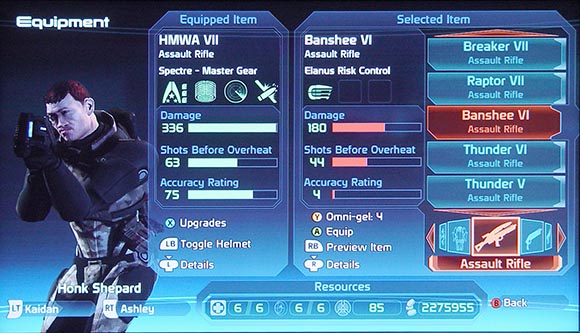
Lets start with the largely popular Mass Effect 1.  Right in the opening mission you are exposed to several different weapon types, and over the course of the game you get literally hundreds of different weapons of various types (lots of duplicate models but that's not so bad).  On top of this, each weapon can be customized with special properties such as extra fire or poison damage.  Additionally there are many different types of armour for your character which has its own customization options.
Mass Effect Equip Screen
Comparing weapon stats.
Altogether this equates to endless options for customization between Shepard and all the crew members you can bring along with you on missions.  Not only can you equip the right weapons for your play style, but you also have many different options when it comes to your character's abilities.  As you level up you can spend points in over a dozen different abilities which increase in power and add effects for each point you spend.

Moving onto ME2, I got my first assault rifle in the opening mission of the game.   I got the second somewhere half into the game, and that was about it.  I personally enjoy using assault rifles and there was maybe a max of 3 different kinds in the game.  To me this was a heart-breaker, as it took away one of my favourite aspects of the original.  I would spend tons of time tinkering around with weapons to get awesome combinations, and it was all taken away for the sequel.  Even the number of abilities was drastically reduced and it all felt a bit too simple.

There was no longer much choice involved, and being an RPG this was not good.  Any of the choices between weapons in ME2 were either obvious or meaningless, because there wasn't really many choices to make at all. Even the armour customization was made into a cosmetic feature, so it added nothing to the actual game play experience.  To be fair the game play and mechanics still held up well, but the whole experience felt a bit shallow in comparison to the endless possibilities in ME1.  From what I've seen in ME3 previews, people wanted back their customization enough for Bioware to take the original's route.  Hopefully they get it right!

How will I ever choose..?
 The second (and maybe even more saddening) example for me was the transition between Supreme Commander's 1 and 2.  When SupCom was released it set a whole new standard for RTS games.  The maps ranged from 5x5 to 81x81 kilometre maps, which you could fill (assuming a powerful computer for the time) with thousands upon thousands of units.  It took the RTS formula and supercharged it with a scale never seen before.  I thoroughly enjoyed both the economic and tier systems in the original, and both were sadly destroyed in SC2.


There were 2 resources in the original and you collected them like a usual RTS.  But the way building things worked was radical in that it wasn't a one-time affair; resources were fluid and your rates increased/decreased depending on how many things you were doing at once.  For example, building a shield generator with 20 engineering units at once would be much faster, but it would drain your energy and mass very quickly.  Once at 0 in a resource, your build speed was capped to your positive resource generation.  This made managing your resources very important and you had to make important decisions on what to build and when.
Note the +1 and +4 at the top; they are the net resource usages.

Apparently people thought this system was too punishing if you got into an economic rut, so the developers changed it back to the typical RTS style for the sequel.  This completely trivialized this aspect of the game, as it became a matter of 'do I have the resources or not?' and the presence of a choice was largely removed.  You either built the unit/building or you didn't.  Since every other RTS works this way, it took away the uniqueness of SupCom that I really enjoyed.


The second and more damaging aspect is the Tech system change between 1 and 2.  The original boasted 4 tech levels, and units in higher ones cost exponentially more.  This meant needing to upgrade your resource collection and unit-building structures.  The effect was that at higher tiers you could pump out low tech units/structures like it was nobody's business.  The game continually progresses over time until you hit tech 4 and began building the huge experimental units (Oh, I need to talk about these too!).
The potential for massive armies and bases in SC1 are limitless.

Back to SC2 and the whole Tech system is completely removed.  Instead of around 50+ units/structures for each faction, it gets dumbed down to a uniform tech system with possible upgrades.  The number of units was cut down to about for each faction and the variety suffered terribly.  You could now upgrade all your units but none of them felt very powerful or exceptional in any way.  By comparison, a Tech 3 Titan in the original could wipe out a whole army of Tech 1 walkers.


With all the units being equalized, none of them felt powerful anymore.  This combined with lower unit counts and smaller maps made SC2 a major disappointment.  Even the awesome experimental units were dumbed down in the sequel; they had 2-3min build times and could be taken out by a dozen normal tanks.  An experimental in SupCom took 5-30min to build and could annihilate everything in its path, and it accentuated the large-scale epic feel of the game.


This is the original SupCom trailer.  It tells you everything you need to know about the game.  I hope the developers take note of the community's outrage at SC2 and (hopefully) think twice before continuing to ruin what made the original amazing.  Complex games aren't for everyone, but when you make a game that tailors to these types of players, don't go back on everything for the sequel.  I played SC2 to the end and never touched it again...